
Gift Notes for Contacts · Android gift preferences app
Give them that
“you remembered” feeling.
A favorite scent. The right size. The little things they mentioned once and you were supposed to remember to give them a gift they'd love.

Thoughtful starts here
Gift preferences.
Saved in your contacts.
Gift Notes for Contacts asks your friends and family for their gift preferences, then parks the details in that person’s contact in your native Android address book. Less guessing. More thoughtful gift giving. Only the person sending the request needs the app.
For partners, friends, and adult family members. An invitation is about future gift ideas, not a promise of an immediate gift.
Meet your new gift-giving habit
Less guessing.
More thoughtful gifts.
From the first invitation to gift details saved in Contacts. Watch the whole idea come together.

Demonstration uses fictional contacts. Music included; playback starts only when you choose.
Explore the four simple stepsFrom “what do they like?” to “I've got this.”
Ask. Remember.
Give thoughtfully.
- 01
YOU PICK
Choose Woman or Man, then pick someone from your contacts. Tap an email address or phone number, or type one yourself.
- 02
REVIEW IT, THEN SEND
The app opens your email or text app with a message that's ready to send. Review it, then tap Send in your messaging app.
- 03
THEIR FORM, THEIR CHOICE
They answer a gift questionnaire in a browser. No app or account needed, and every question is optional: sizes, favorites, hobbies, scents, jewelry, flowers, dates, and things to skip.
- 04
YOU CHECK WHEN YOU’RE READY
Open the app or tap Check for Replies. Answers save into that contact’s Notes section of the Android address book. Turn on Preview in Settings to review their answers before they’re saved.
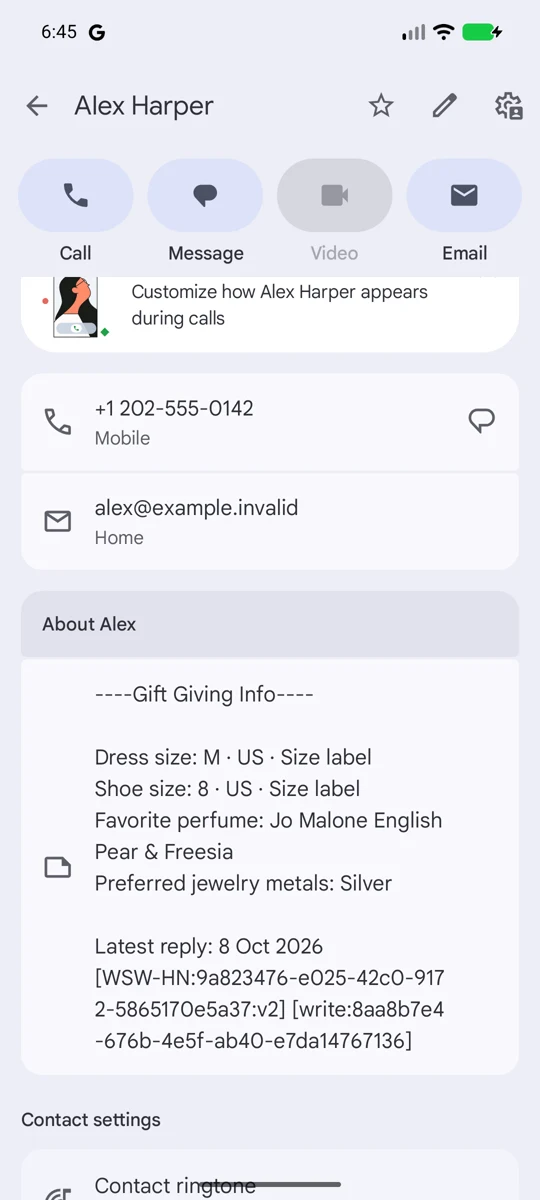
A good memory, in your pocket
That scent.
The right size.
The things they love.
Tap a name to open the contact. Saved notes stay in your address book after you uninstall.
Your native Android contacts app syncs those notes to other devices.
Contact syncing depends on your address-book provider and settings.
Good to know
Thoughtful about
their information, too.
Replies are temporarily stored encrypted for delivery. They are not kept as a permanent gift profile on our servers. A private management link can delete that temporary copy. Answers are not used for marketing.
For adults 18 and older. Invite adults only. Requires Android 10 or later, supported Google Play services, Google sign-in, Contacts read/write permission, and an internet connection.
Received an invitation? Open the private link in the message you were sent. You don't need to download the app to answer.
Read the Privacy Policy ↗
The gift notebook
Thoughtful gifts start with the little things.
The right size. A scent they actually like. Borrow a few good questions and save yourself some gift-shop guesswork.
Read the gift-giving guide ↗Make the next gift feel personal
Give something
they'll love.

Gift Notes for Contacts · Android